



In ecommerce, the number of sales is directly connected to the speed at which website content is being delivered.
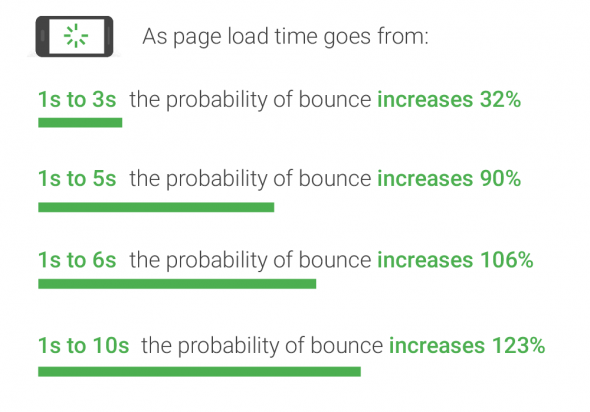
Akamai, currently the world’s largest CDN services provider, ran a research in 2017 that went on to show that:
Performance has a direct impact on your website revenue, metrics that influence brand perception, loyalty and visitor engagement.
Like we've said before, to properly optimize your website speed, you first have to measure it. Website speed tests are the easiest way to test that speed.
Google confirmed that website speed influences some 1% of the search queries, but given the big competitiveness for specific keywords and other ranking factors, when all else is similar or equal, website speed should come as a factor in rankings. Furthermore, website speed influences bounce rates of your visitors, alongside with other website metrics (time on site, average pageviews, exit rates) so it may influence other "soft" ranking factors that Google doesn't eagerly promote (like links, relevancy, domain authority).
And research has shown that Google might be specifically measuring time to first byte as when it considers page speed. In addition, a slow page speed means that search engines can crawl fewer pages using their allocated crawl budget, and this could negatively affect your indexation.
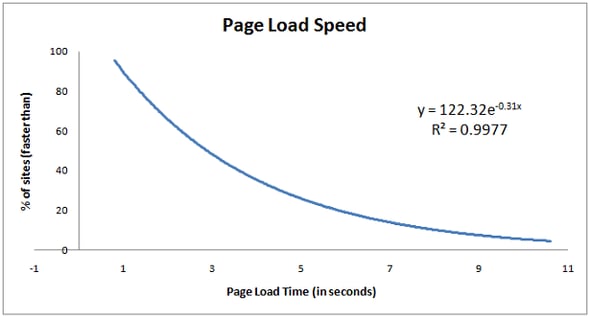
In 2011, on SEOMoz we saw this post where yet another calculation of speed is done by Geoff Kenyon where he reverse engineered the equation:
y = 122.32e-0.31x
In this equation, x is the time it takes your page to load (in seconds) and the result, y is approximately the percent of pages that your page is faster than.
Whether your customers are there for a pretty interface, clear privacy policies, for the best bargain, or simply because they have found exactly what they were looking for, they had to get there in the first place, and quickly. If you could cut that path to your website even shorter, and this is a matter of milliseconds, you could convert more visits to actual orders.
An advantage of 250 milliseconds of a page load time, according to recent research, is what keeps your customer from going to your competitor. Have you done research to compare your page load time with competitors?
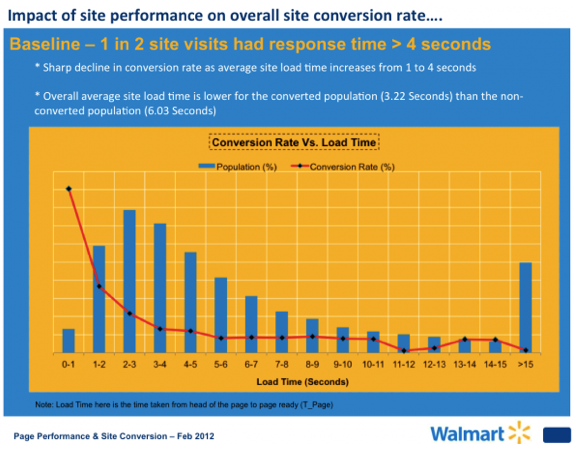
Take an example of Walmart. When they found out they were not the fastest retail site on the internet, compared to EBay, Amazon etc., they have decided to overhaul their site speed. As a result:
To learn more about how website speed affects conversion rates, read this article.
Domain Name System (DNS) is critical to the performance and reliability of your internet applications and cloud services. A cloud-based DNS can deliver even better results than regular DNS infrastructure.
DNS is mission-critical to all organizations that rely on the Internet for conducting business. DNS failure or poor performance leads to applications, data and content becoming unavailable, causing user frustration, lost sales and business reputation damage.
Every user’s frst interaction with your website begins with a series of DNS queries. Poor DNS performance can lead to slow page loads, dissatisfied customers, and lost business. Cloud-based DNS services extend DNS performance, resiliency, and scalability helping you ensure superior user experiences across the globe.
Your online applications and digital content may be scattered across the internet. Some assets might reside in your corporate data center, some might be distributed across a CDN and some might reside in the cloud. DNS is responsible for steering users to the correct source.
DNS performance and availability are central to the user experience. A contemporary webpage can involve dozens of DNS lookups. For complex webpages, DNS resolution canž comprise as much as 29% of initial page load time.
If DNS query responses are slow because of internet congestion or latency the user experience will be impaired (and users may abandon your site). Worse still, if your DNS infrastructure is unreachable because of equipment problems, network outages or a DDoS attack, users may not be able to access the data and content on your site—regardless of where it resides.
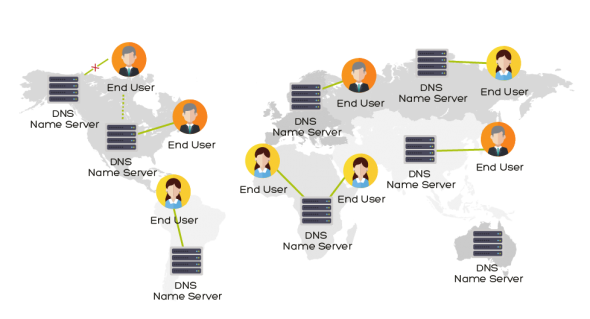
Pairing a managed DNS solution with your CDN provides your website with extra performance, reliability, and flexibility.
As your business grows, your DNS follows your steps. Managed DNS allows you to add services and features and it’s simple to update. Managed DNS services can help you boost revenues, reduce website abandonment, and improve customer satisfaction by quickly connecting users to the resources they need. A good first impression starts with DNS.
These are the key advantages of a paired DNS/CDN solution:


“GlobalDots has helped us a lot in monitoring without human intervention.
The anomaly detection basically discovered 80% of the bugs we have, and 100% of the downtime we had.
It has by far surpassed anything we thought it will achieve in a way the alerts become almost irrelevant.”
Shmulik Ahituv, Payoneer
DevOps Team Leader

“This platform is nothing short of amazing!
On the first day (and without any customization whatsoever) we already got new insight that we were not able to see before.
A week in and our ops teams across the board were already able to get so much more out of our logs. It's a game changer.”
Dekel Shavit,
Biocatch • CISO

"I approached GlobalDots because I was looking for a great cloud-based WAF and DDoS protection provider for our customers that would not hinder performance. GlobalDots helped me by discussing the options on the market and helping us choose the best fit for us. The result was a great product at a great price. It was an easy and informative experience and I would recommend GlobalDots to anyone that is in the market for IT performance and security technologies."
Eric Joyce, KalioCommerce
Director, Hosting and Security